
Docling for IBM watsonx: A Managed Service, Built on Open Source
Putting Docling into production has, until now, meant running the infrastructure yourself: deploy the services, configure the pipeline, plan for capacity, and keep it all healthy under load. That is very doable, but it is work that sits between a team and the actual goal of turning documents into AI-ready data.
Docling for IBM watsonx removes that step. It is a managed Docling-as-a-Service offering that lets teams put Docling into production without deploying, configuring, and maintaining the underlying infrastructure themselves. It is designed for a quicker path to value: out-of-the-box configuration, automatic scaling based on workload demand, and high-throughput processing without having to plan and manage dedicated capacity.
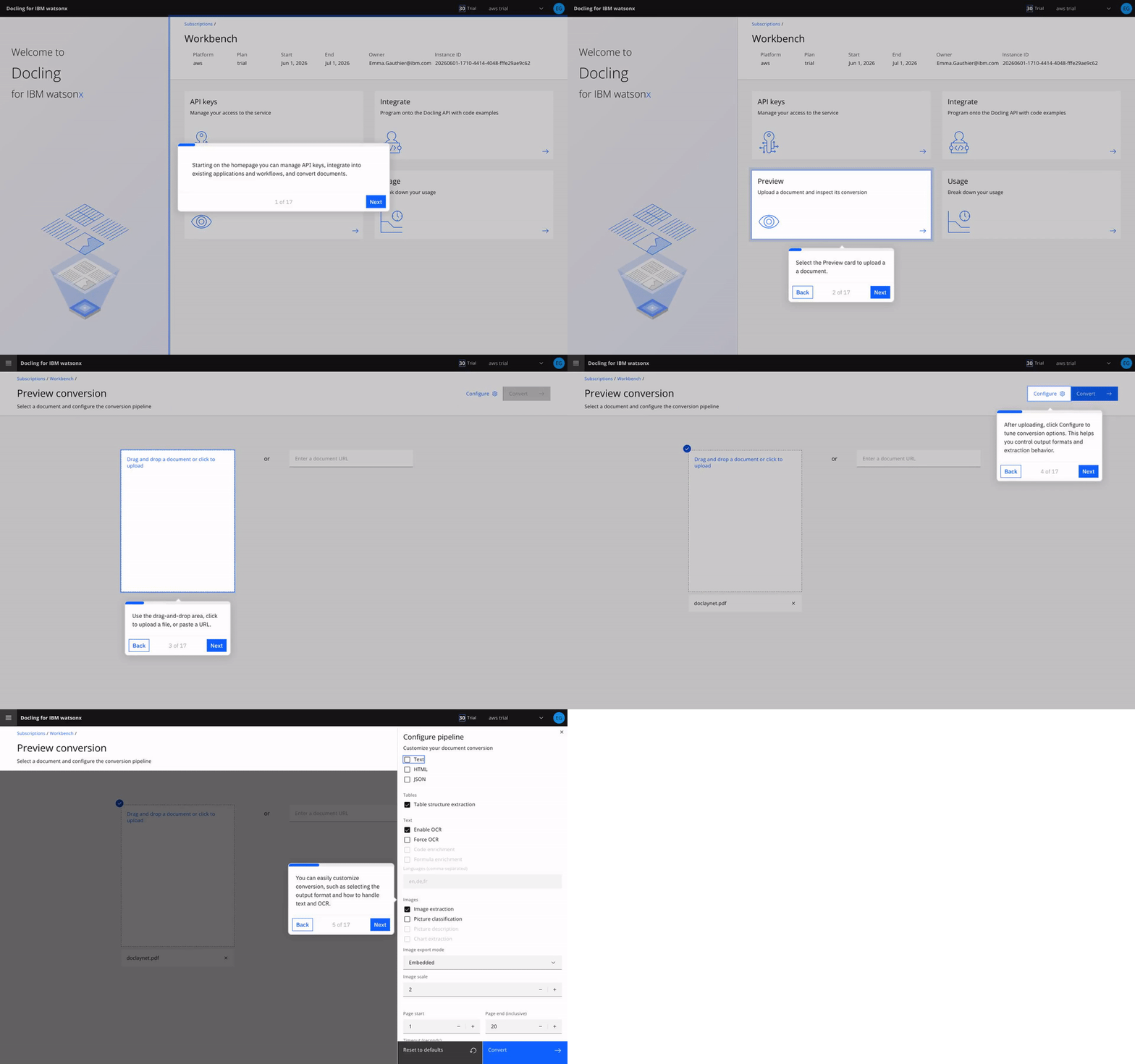
You can use it through a simple user interface for experimentation, inspection, and quick document processing. At scale, the same capabilities embed directly into production applications, automation pipelines, and enterprise AI workflows through easy-to-use APIs.
The most important thing to say about it, though, is what it means for the open-source project. So let us start there.
What this means for Docling as open source
Docling is open source first, and Docling for IBM watsonx does not change that.
The managed service is not a fork and not a proprietary re-implementation. It
runs the same open stack everyone else uses: docling, docling-core,
docling-parse, docling-jobkit, and docling-serve.
That ordering is the whole point. The work required to run a production-grade, high-throughput managed service does not disappear into a private branch. It lands in the open repositories as fixes and features that every Docling user benefits from. Running Docling at scale is what surfaces the sharp edges, and across the first half of 2026 you can watch those edges getting filed down, release after release. The dominant theme of the year so far has not been new headline features. It has been hardening: stability, memory control, safe parallelism, and security.
A few concrete examples make the point.
A thread-safe, memory-bounded parser
The largest single investment has been in docling-parse, the C++/Python PDF
engine at the bottom of the stack. Its 2026 releases read almost like a
hardening checklist.
Early in the year the work was about not crashing: replacing fixed-size buffers
with a safer append strategy to prevent segfaults, and robustifying parsing of
broken PDFs. Then it was about not hanging: fixing an infinite loop in
table-of-contents extraction triggered by circular references inside a PDF.
Then it was about doing more at once, safely: making the parser thread-safe by
default, adding a regexp fast path for stream decoding, and shipping
memory-management improvements coordinated with the upstream docling library.
That arc culminated in the v6 major release: a public threaded PDF parser with
a worker thread pool and a max_concurrent_results cap that explicitly bounds
how many results are buffered in order to limit memory. Results stream out one
at a time, each carrying its own success flag, error message, and timing
information, so a single bad page no longer takes down a whole batch. The same
release upgraded pillow, requests, pygments, and cryptography to close
known vulnerabilities, and later updates added a flag to skip bitmap byte
extraction entirely when a caller does not need it, trimming memory further.
This work targets a problem the community knew well. The older v4 parser could accumulate memory on very long documents, climbing well past 20 GB where other backends held steady around 4 GB. A bounded-memory, parallel, error-isolating parser is the proper fix, and it is sitting in the open repository for anyone to use.
Hardening all the way up the stack
The parser is not the only place this shows up.
In docling itself, 2026 brought a steady stream of reliability fixes across
the backends. PPTX conversion now skips malformed shapes instead of aborting
the whole file. The Markdown backend gained a fix that prevents a
RecursionError on certain inputs. The LaTeX handler added path-traversal
prevention, and input validation was strengthened for METS-GBS and USPTO XML
sources. The library adopted the threaded docling-parse v6 backend and
introduced a modular docling-slim package for a lighter dependency footprint.
In docling-core, the focus was data-model integrity: validation to catch
duplicate references, repair of table hierarchies when rich cells break the
structure, and a fix to prevent numeric precision loss when serializing tables
to Markdown.
In docling-jobkit, the distributed execution layer, the theme was resilience
against real infrastructure. It can now recover orphaned job status when a
worker pod is killed mid-execution, cap the maximum number of Redis connections
to avoid pool exhaustion, and run a hardened Ray dispatcher with execution
leases and a watchdog that cleans up stuck jobs.
In docling-serve, the API service, operational hardening took the lead:
readiness endpoints for clean Kubernetes rollouts, metrics on a separate port,
removal of an expensive forced garbage collection from the status-poll hot
path, control over how much error detail public API responses expose, failing
fast on a bad config file, and server-side page slicing for very long PDFs.
None of this is glamorous, and that is the point. It is exactly the kind of unglamorous reliability work you want underneath a service you are going to trust with a production workflow, and all of it is open source.
Processing data at scale with the batch endpoint
Built on that hardened foundation, one of the most requested capabilities is now available: a batch endpoint for processing large volumes of documents in a single job.
Instead of submitting documents one request at a time, you can point Docling at
a source, for example an S3 bucket, and have it process the entire collection
and write the converted results back to a target location. This sits on top of
the docling-jobkit orchestration work that landed throughout 2026, so the
same resilience guarantees that protect a single conversion also apply to a
million-page run.
For teams with large document estates, archives, scanned back-catalogs, or regulatory filings, this turns "convert everything" from a bespoke pipeline you have to build and babysit into a single managed job.
The new Docling Service Client
Whether you run your own open-source docling-serve deployment or use the
managed SaaS, you can now talk to it through the new Docling Service Client.
Two things make it worth adopting. First, it is ultra lightweight. It installs
without the heavy AI packages, with no torch, no model weights, and none of
the inference dependencies. It is just the parts you need to submit work and
collect results, which makes it trivial to drop into an application, a
serverless function, or an automation step without bloating the environment.
Second, it is efficient by design. It handles the submission of conversion tasks for you, including the polling and waiting loop and efficient batching, so you are not hand-rolling retry logic and status checks around the API.
The same client works against either backend. You can prototype against a local
docling-serve, then point the exact same code at Docling for IBM watsonx when
you are ready to scale, with no rewrite required.
Installation
The Service Client is available in two ways. If you already have the full
Docling package installed, the client is included and ready to use. If you want
to keep your environment minimal, you can install just the client through the
slim package with the service-client extra:
# option 1) included in the full Docling install
pip install docling

# option 2) slim/modular install with minimal dependencies
pip install "docling-slim[service-client]"
Usage
Here is a simple example showing how to use the Service Client:
from pathlib import Path
from docling.service_client import DoclingServiceClient
import os

# Setup required endpoint details
SERVICE_URL = os.getenv("DOCLING_SERVICE_URL")
API_KEY = os.getenv("DOCLING_API_KEY")

# Initialize the client
with DoclingServiceClient(url=SERVICE_URL, api_key=API_KEY) as client:
    # Convert a document as you usually do
    result = client.convert(
        source=Path("path/to/doc.pdf")
    )

    markdown = result.document.export_to_markdown()
    print(markdown)
For more examples including batch processing, custom export formats, and advanced configuration options, see the Service Client examples in the Docling repository.
Getting started with Docling for IBM watsonx
Docling for IBM watsonx is generally available now as a SaaS offering. You can try it for free and start processing documents through an easy-to-use interface, then move to API-based integration when you are ready to embed document intelligence into production workflows.
The service is available through the IBM Marketplace or the AWS Marketplace with a pay-as-you-go pricing.
The result is a practical and cost-effective way to turn complex documents into reusable, AI-ready data, while reducing the manual effort, cost, and operational complexity that can slow AI initiatives down.
Recap
A managed service and a healthy open-source project are not in tension here. Docling for IBM watsonx exists because the open Docling stack is good enough to run in production, and the open stack is good enough to run in production because the work of building the managed service flows straight back into it.
If you have been waiting for Docling to feel production-ready, the 2026 hardening releases are the signal. Pull the latest, point the new Service Client at it, and tell us what you build.